Why your SaaS blog gets traffic but no signups
Your traffic climbs and your signups don't. Here are the 5 root causes, the checks that find yours, and the fix for each one.
Your traffic chart climbs every month. Your signup count hasn't moved.
Here's the short answer. Most of those visitors came to learn something, learned it and left. Your product never had a part in it.
In this article, I'll show you the 5 root causes. Then I'll show you how to find yours and how to fix it.
01 / 07Why am I getting traffic but no signups?#
Because traffic and signups measure 2 different things. Traffic counts readers, and signups count buyers.
A blog can grow the first number for years without touching the second.
Rand Fishkin, the co-founder of SparkToro, says it in 5 words:
Traffic is a vanity metric.
The goal was always customers. Traffic was only a hint that they might be coming.
Let me make this concrete with a made-up company. Meet Billbo, an invoicing tool for freelancers. I invented it, so don't go looking for it.
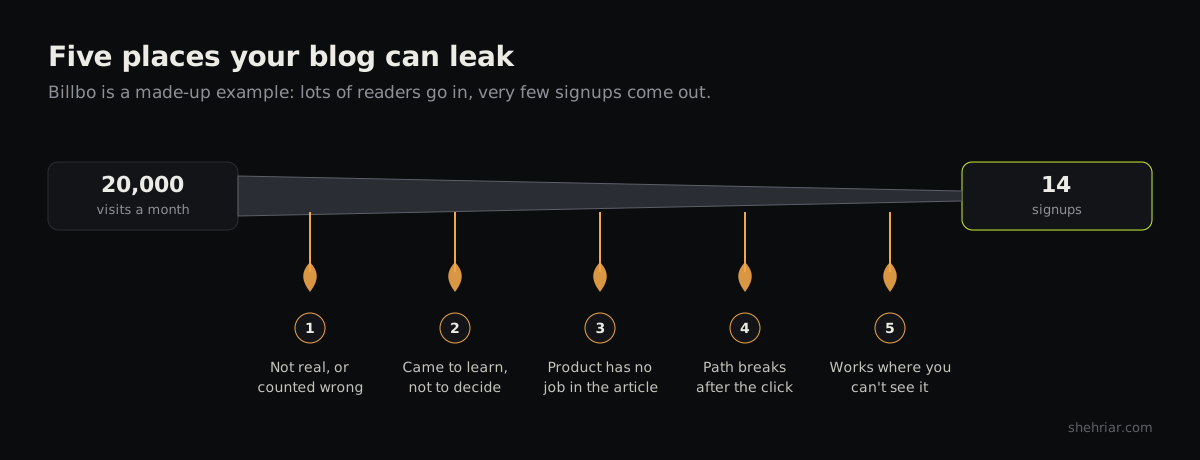
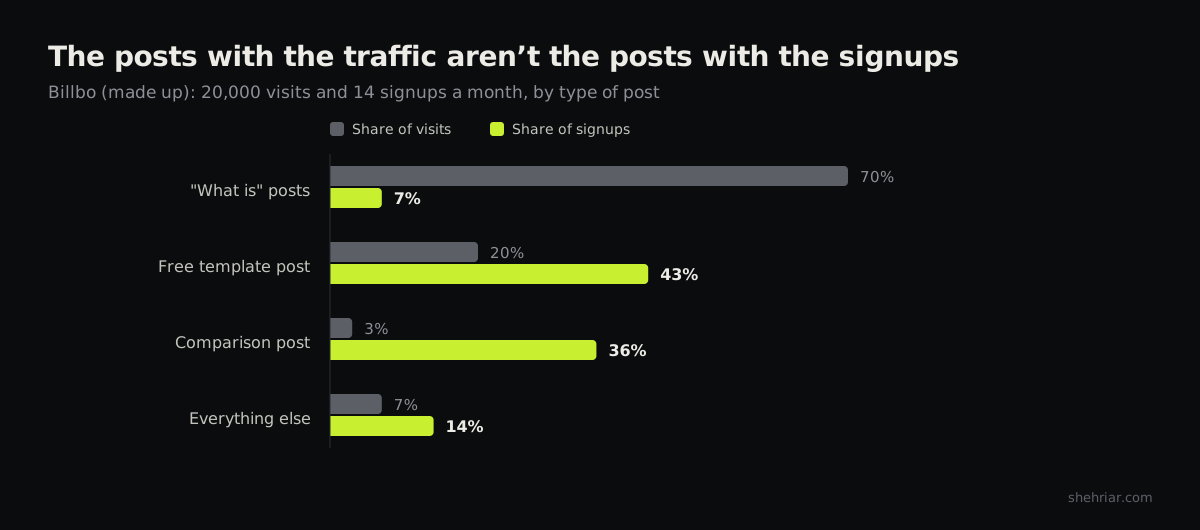
Billbo's blog gets 20,000 visits a month and 14 signups. That's 1 signup for every 1,429 visits.
We'll diagnose Billbo as we go.
It's getting worse, for 2 reasons#
Reason 1: AI answers the question before the click.
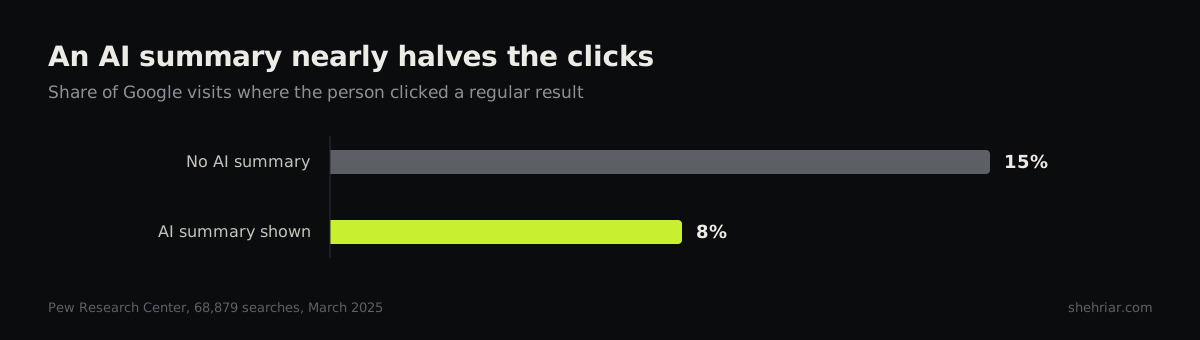
Pew Research tracked 68,879 real Google searches in March 2025.
With an AI summary on the page, people clicked a regular result in 8% of visits. Without one, they clicked in 15%.
Ahrefs studied 300,000 keywords. With an AI Overview showing, the top result's click rate was 58% lower.
That's a correlation, not a lab test. Still, the direction is hard to miss.
The clicks that vanish first are the "what is" searches. Those readers were never going to sign up anyway.
So the loss hurts your chart more than your revenue. It also means the easy traffic isn't coming back.
Reason 2: teams mass-produce content with AI.
The usual reaction to falling traffic is to publish more. AI makes that almost free, so teams ship 100 posts a month.
Let me be clear, because I'm not against AI. I think it's among the best things to happen to content marketing.
My problem is with how people use it. They mass-produce posts with no material behind them and no value inside them.
AI also tends to miss intent. It can't know what your reader is really after unless you find out and tell it.
So you get 100 posts answering questions that no buyer asked.
Orbit Media surveys bloggers every year. In 2026, only 13.9% of 1,042 marketers reported strong results from their blog.
That's the lowest figure the survey has recorded. Andy Crestodina, who runs it, sums up the AI part in 1 line:
AI makes you faster, but speed isn't the point.
More posts won't plug a leak. Finding the leak will, so let's see where blogs leak.
02 / 07The 5 root causes#
A blog loses signups in 5 places. Most advice covers only cause 2, search intent. That's 1 cause out of 5.
Cause 1: The numbers are wrong#
Sometimes there's no leak, only a bad count. You count visitors who aren't there, or you miss signups that are.
Impressions get read as visits. Bots get counted as readers. A signup event quietly stops firing after a redesign.
Small samples fool you too. A post with 300 visits and 0 signups hasn't proven anything yet.
Cause 2: The readers came to learn, not to buy#
This is the famous one. To see it, you need the content funnel.
A content funnel is the path from a stranger's first search to a signup. It has 3 stages: learn, compare and decide.
| Stage | The reader wants | Example post | What to expect |
|---|---|---|---|
| Learn (top of the funnel) | An answer | "What is an invoice?" | Almost no signups |
| Compare (middle) | A way to do the job | "How to invoice a client overseas" | Some signups |
| Decide (bottom of the funnel) | To pick a tool | "Billbo vs. the big-name tool" | The most signups |
How big is the gap? Grow and Convert, a content agency, measured 95 of its client posts.
Posts comparing alternatives converted at 8.43%. How-to posts tied to a job converted at 2.44%.
In 1 client's report, top-of-funnel posts converted between 0.03% and 0.19%.
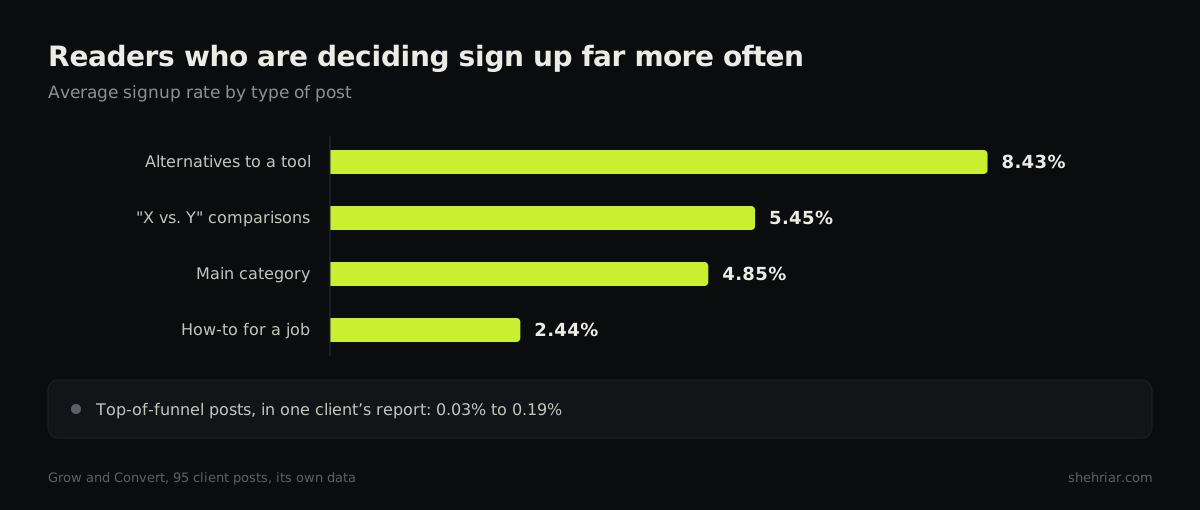
That's 1 agency's data from its own clients. Treat it as a direction, not a benchmark.
So a blog full of "learn" posts gets "learn" results. That part is simple.
But intent has 2 nastier cousins. I've met both, more than once.
The wrong audience. I once wrote a how-to article on a hugely popular consumer topic. Clicks poured in, and so did free signups.
Paid signups stayed at 0. The topic belongs to everyday consumers, and I was showing them a B2B tool.
The wrong intent. Another blog I worked on got about 70% of its traffic from 1 keyword.
It looked like a jackpot. Here's the page in Search Console, taking off in late August.
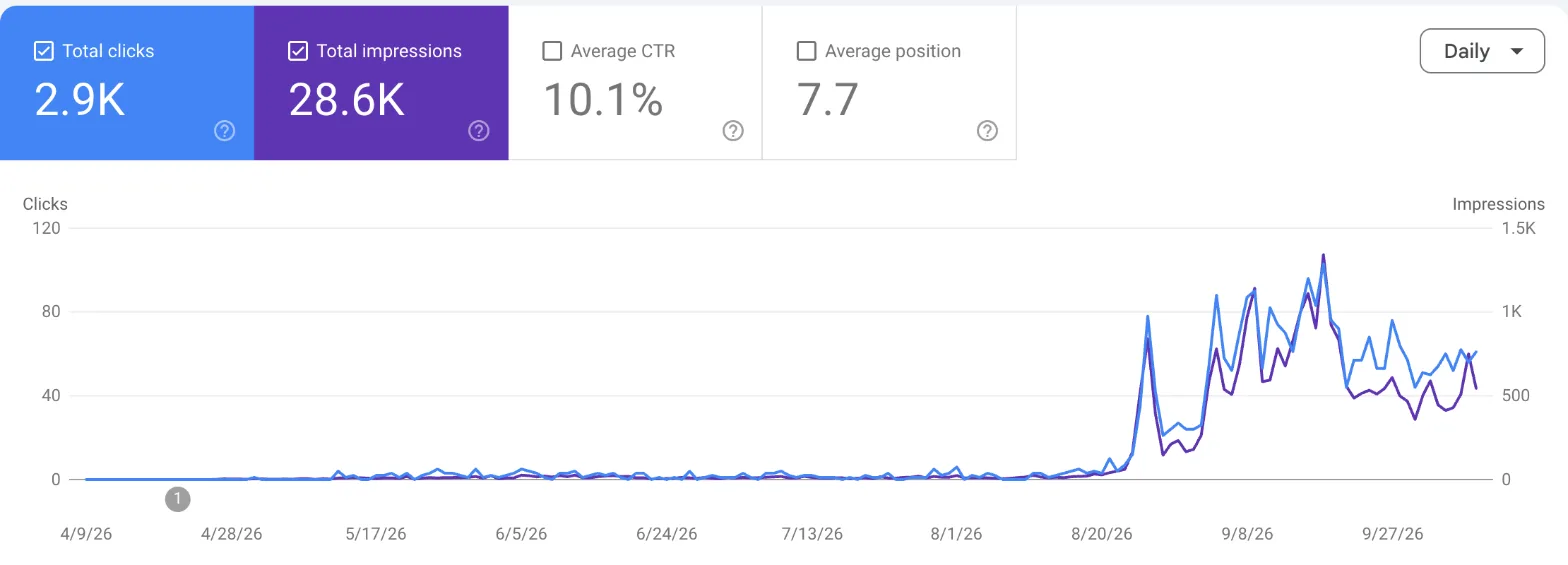
But many people who type that phrase want something shady.
The product was built for professionals. Those visitors landed, felt let down and bounced.
I call posts like these parasite articles. They feed on your effort and give the business nothing back.
Eli Schwartz, who wrote the book Product-Led SEO, has a better name for the result:
If none of them convert, you've built a traffic museum, not a business.
And a parasite article costs more than the afternoon you spent writing it:
- It costs money. Free users still use your servers and your support team.
- It muddies your numbers. Your average drops, and your best posts look worse than they are.
- It steers your team wrong. Everyone asks for more of what went viral.
- It can hurt your emails. Gmail wants reported spam under 0.1%. Uninterested signups love that spam button.
- It can weigh on your whole site. Google says removing unhelpful content can help your good content perform better.
To be fair, a giant brand can afford a few parasites. Most self-serve SaaS teams can't.
Cause 3: Your product has no job in the article#
Here the right reader shows up, and the article never needs your product. They finish reading with no reason to click.
I once wrote an article of writing tips. The product was a tool in the same field, so it felt close enough.
The article ranked in search, and AI assistants cited it. It still never converted.
It taught a writing tip and stopped there. Nothing in it was built to lead anyone to the product.
Tim Soulo at Ahrefs calls this business potential. He scores each topic from 0 to 3 on how naturally the product fits.
Fio Dossetto describes 3 levels of product-led content. Here they are in plain words:
- Linked. The product gets a link somewhere. Readers can ignore it.
- Pointed at. A button says "try it". Readers mostly ignore that too.
- Doing a step. The reader watches the product solve part of the problem.
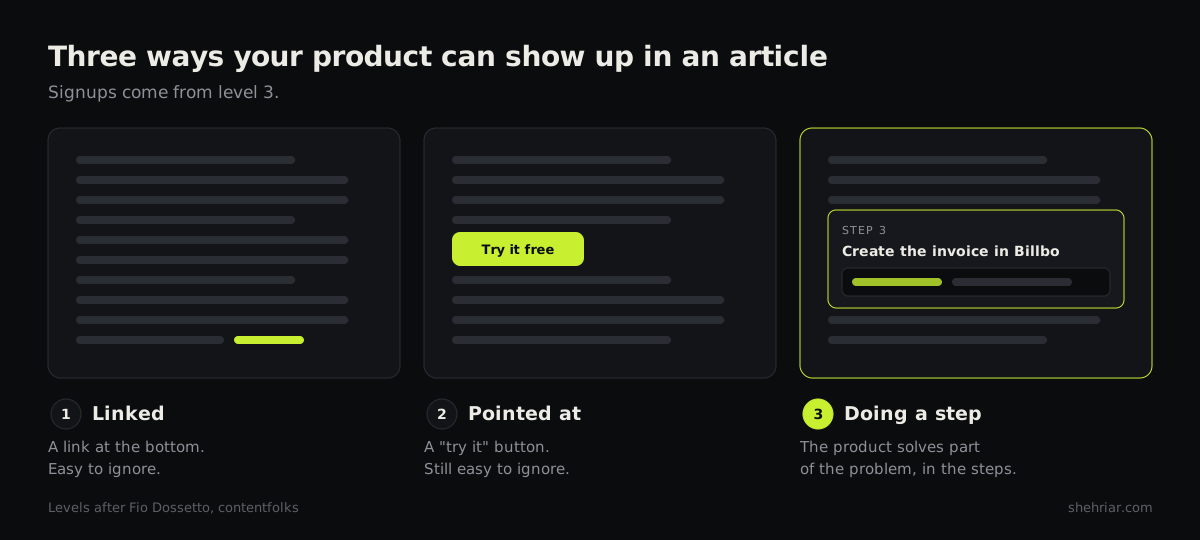
Signups come from level 3.
Think of Batman. The grappling hook matters because he uses it in the scene. Nobody remembers a gadget that stayed on the belt.
This is also where mass-produced AI posts fail. A model that has never used your product can't give it a real job.
Cause 4: The path breaks after the click#
Sometimes the article works. The right reader clicks through, and then your site loses them.
The product page changes the subject. The signup form asks for too much. The product doesn't deliver a first result.
Here's the blunt part. If the right readers reach your product and still leave, more content won't help.
Growth advisor Elena Verna puts your website inside the product, where it belongs:
Your website isn't just a showcase for your vibe; it's the first step in activation.
Cause 5: It's working where you can't see it#
Sometimes the blog works, and your analytics miss it.
GA4 credits a signup to the last visit that wasn't direct. That rule hides a lot.
Picture a reader who enjoys 5 of your posts. A week later, she types your address and signs up.
If GA4 has lost track of her by then, it files her under "direct". Your blog gets no credit.
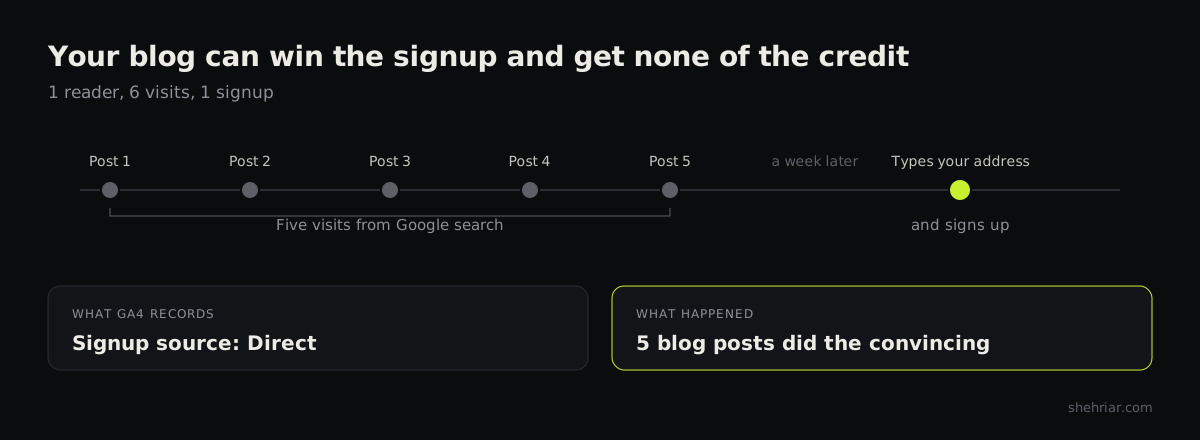
Kevin Indig of Growth Memo argues attribution never measured unpaid marketing well. Clicks only made it look that way.
03 / 07How to identify your leak: 5 checks, in order#
Run these in order, because each check can save you the next. You need Search Console, GA4 and about 2 hours.
Check 1: Are the numbers right?#
Start here. Bad numbers will fool you in every later check.
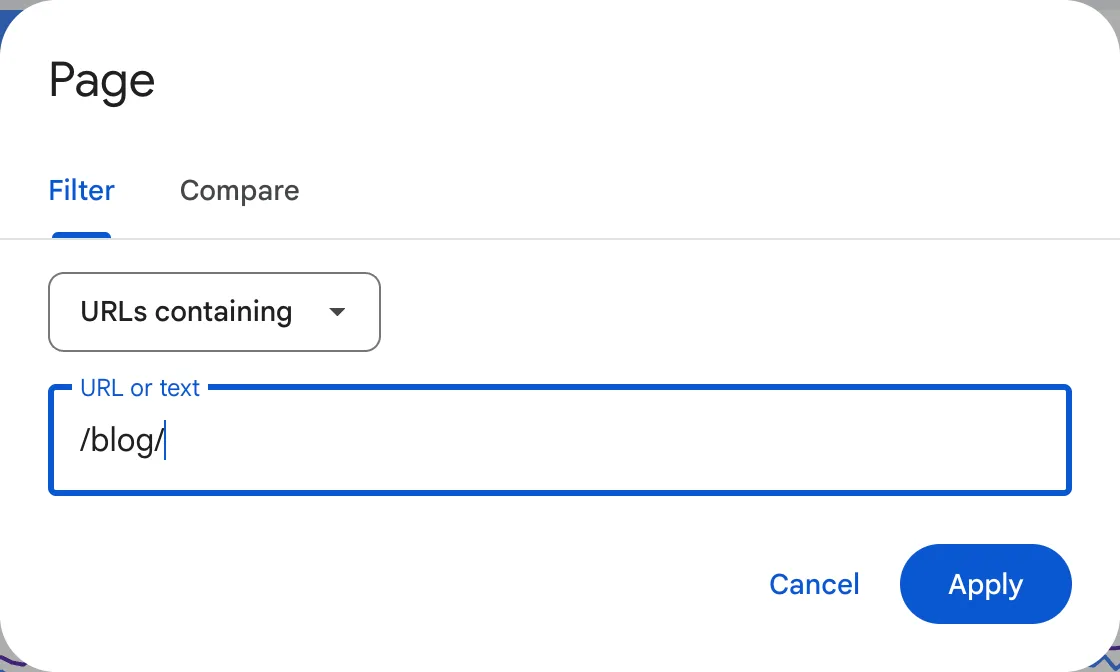
- In Search Console, open Performance, then Search results. Set the date range to 6 months.
- Add a Page filter for URLs containing
/blog/. Read the Clicks number, not Impressions. - Open the Countries tab. Note how many clicks come from markets you sell to.
- In GA4, open the Landing page report and filter it to
/blog/. Compare sessions with those clicks. - Sign up yourself through every path: email, Google login and invite link.
- Watch GA4's DebugView while you do it. The signup event should fire every time.
- Check that the event is marked as a key event. Otherwise your reports won't count it.
Why clicks and not impressions? Look at this real site over 6 months.
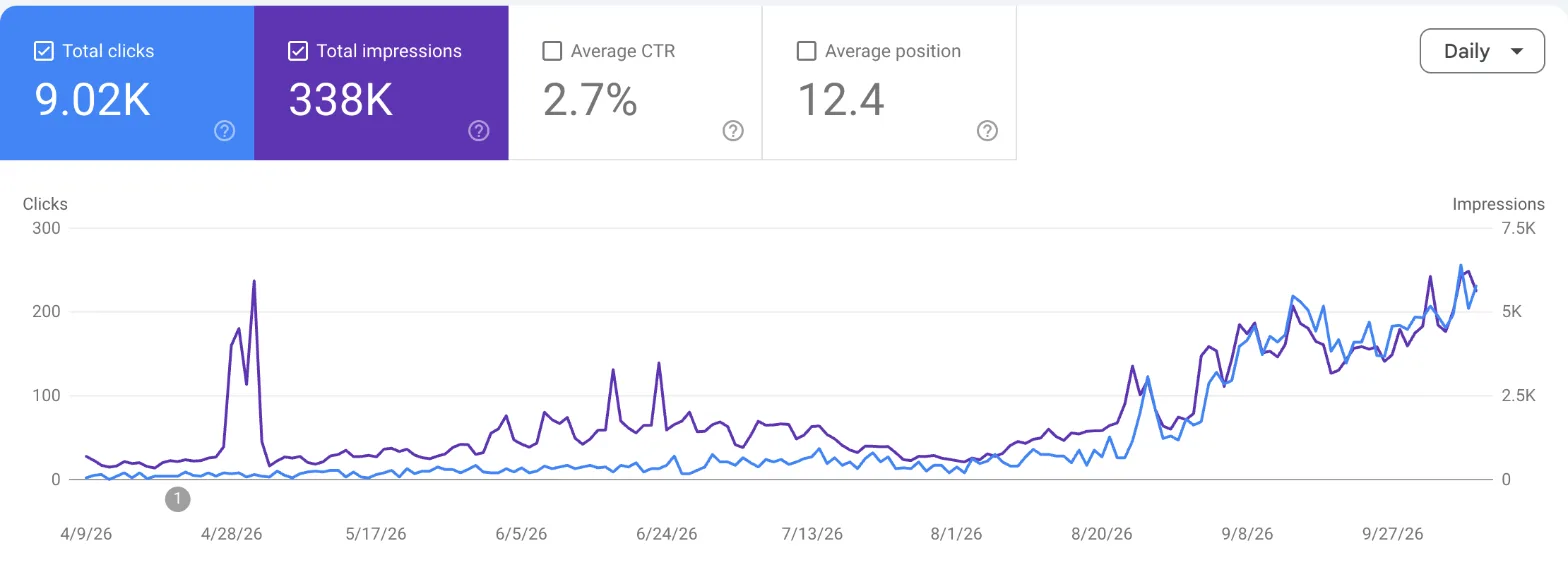
Google showed its pages 338,000 times. Only 9,020 of those became visits.
The 2 numbers in step 4 never match exactly. A big gap means something is miscounted.
GA4 already filters known bots. The rest show up as sudden spikes from 1 city with almost 0 engagement time.
Do your blog and app sit on different domains? Then turn on cross-domain tracking. You'll find it in Admin, under your data stream's tag settings.
Without it, every reader becomes a brand-new visitor at the handoff.
Next, check your sample size. Say a post got 300 visits and 3 signups.
Its true rate could sit anywhere from 0.2% to 2.9%.
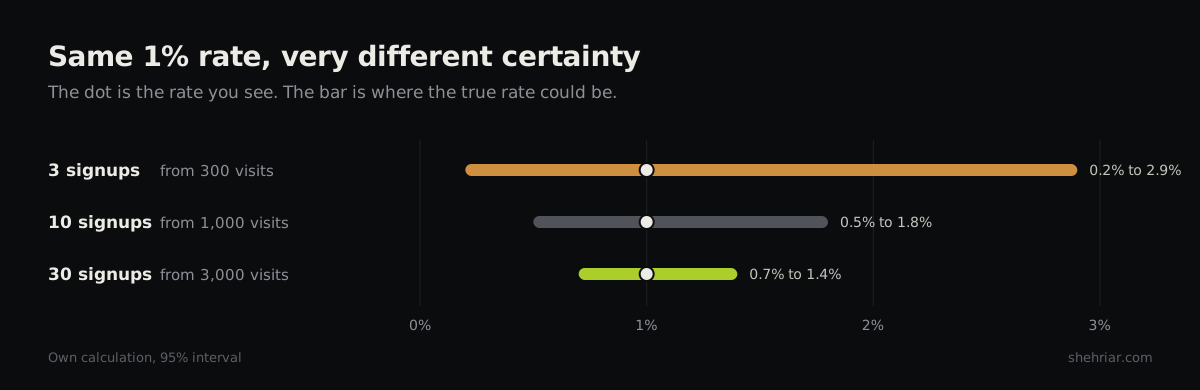
My rule of thumb: wait for about 30 signups per type of post before you judge.
1 last trap. In GA4, a visit longer than 10 seconds counts as engaged.
A reader can stay 11 seconds, leave and still look fine. So don't lean on engagement rate.
You have this leak if clicks and sessions disagree badly, or your test signup doesn't show up.
Billbo's result: the traffic is real, and tracking works. No leak here, so we move on.
Check 2: Who is reading, and what did they want?#
Stay in Search Console and keep the /blog/ filter on.
- Open the Queries tab and add a Query filter. Under By keyword, choose Custom (regex).
- Paste the "learn" pattern:
^(what|why|who|when) |meaning|definition. Write down the clicks. - Swap in the "decide" pattern:
vs |alternative|best |pricing|review|software|template. Write down the clicks. - Subtract both from the total. What's left is mostly "how to" traffic, your middle.
- Open the Pages tab and sort by clicks. Take your top 20 posts.
- Click each post, then open Queries. See which searches bring its readers.
- For each post, open Countries too. Compare the list with where your customers are.
- In GA4, open the Landing page report. Note sessions and signups for each of the 20.
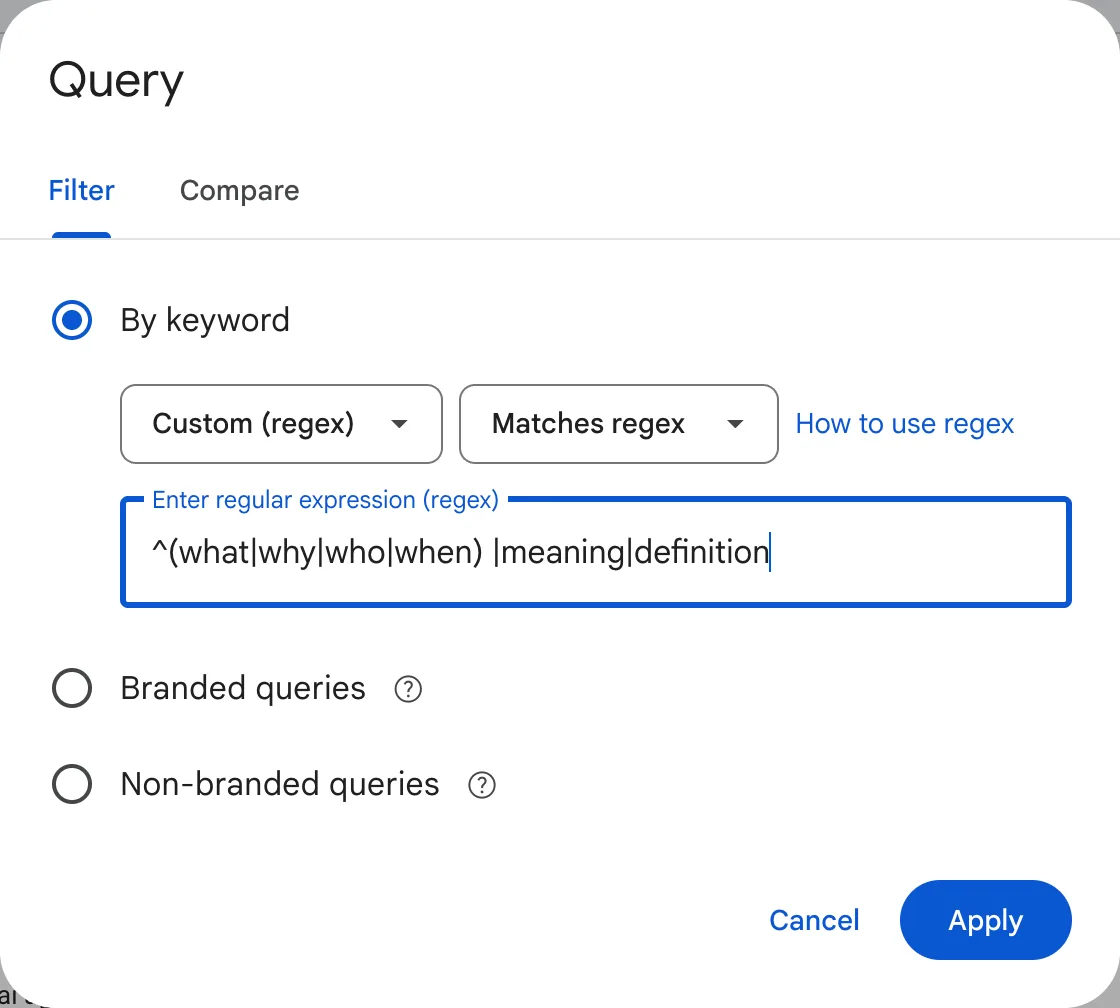
Adjust the patterns to your market. The point is 3 piles: learn, compare and decide.
In step 6, look for a post where 1 search brings most of the clicks. Read that search like a suspect.
Here's a real page with that problem. 1 search brought 1,342 clicks, and the next brought 44.
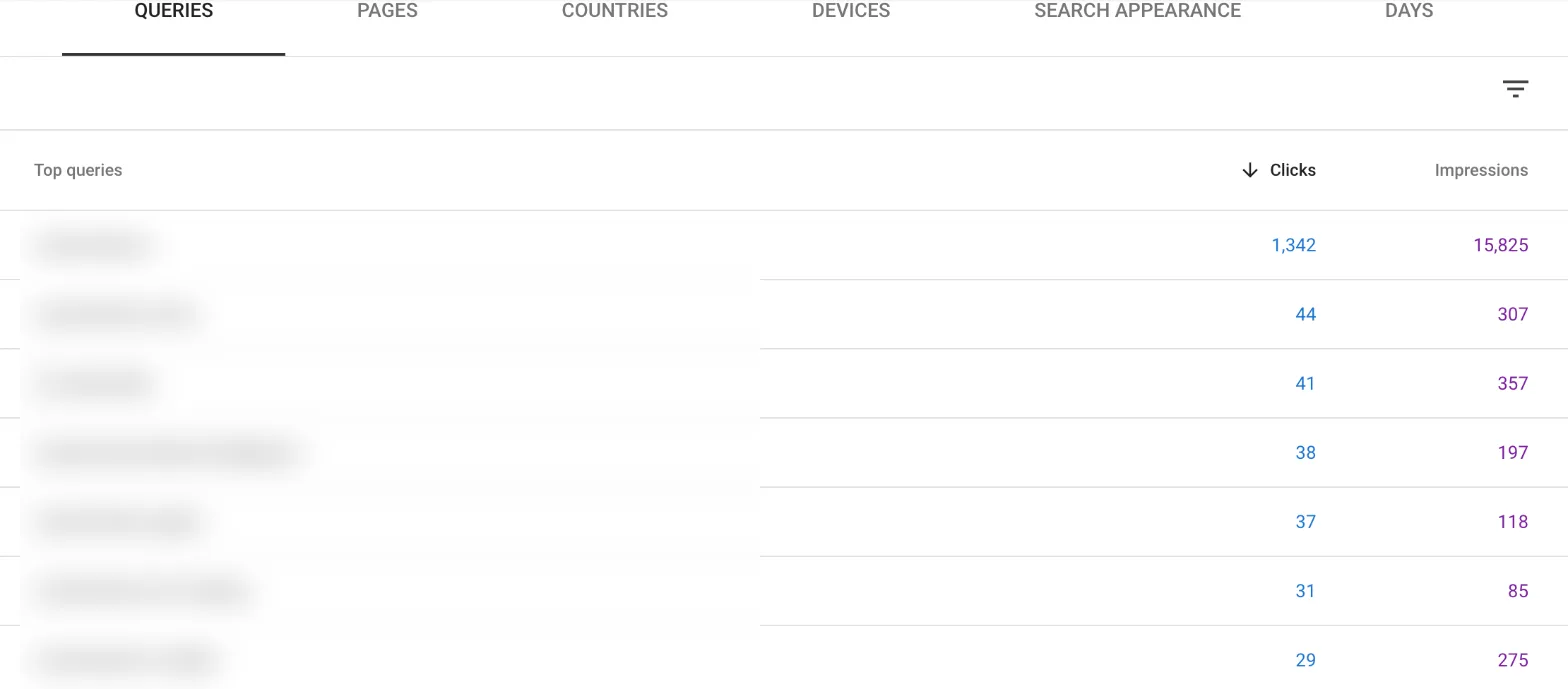
Who types it? What do they want? Would that person ever pay for your product?
Then put the 20 posts in a spreadsheet and group them by type. Skip the blog-wide average.
It blends your best post with your worst and tells you nothing.
Here's why that matters. Grow and Convert had a post ranked 16th by traffic.
It got 1,612 pageviews and 39 signups. The traffic leaders did far worse.
You have this leak if most clicks sit in the "learn" pile. An odd search that dominates a post counts too.
So do readers from markets you don't sell to.
Billbo's result: 14,000 of its 20,000 visits land on "what is" posts. Those posts brought 1 signup.
Check 3: Does the product have a job in each post?#
Go back to your top 20 posts. Score each from 0 to 3, the way Tim Soulo does:
- 3: the reader can't really solve the problem without your product.
- 2: the product helps a lot, but the reader could manage without it.
- 1: you could mention the product in passing, and that's all.
- 0: there's no honest way to mention it.
Now search each post for your product's name. Where does it first appear, and what is it doing there?
Match what you find to the 3 levels: linked, pointed at, or doing a step.
Then ask my 2 questions about every post that scored 2 or 3:
- If I remove the product step, is the article still complete?
- If I add the product step, will the reader thank me?
2 yeses mean the product has a real job there.
You have this leak if a post scores 2 or 3 and the product only appears as a link.
Billbo's result: its free template post draws freelancers who need an invoice today. Billbo creates invoices, so that's a 3.
But the post only links to Billbo at the very bottom. The product has a job, and the article never shows it.
Check 4: Where do they drop after the click?#
Most guides stop at the click. GA4 can show you what happens next.
- In GA4, open Explore and start a Funnel exploration.
- Step 1: a page view where the page path contains
/blog/. - Step 2: a page view of your product or pricing page.
- Step 3: a page view of your signup page.
- Step 4: your signup event.
- Does your product track a first real action? Add it as step 5.
- To compare posts, change step 1 to a single post's path and run it again.
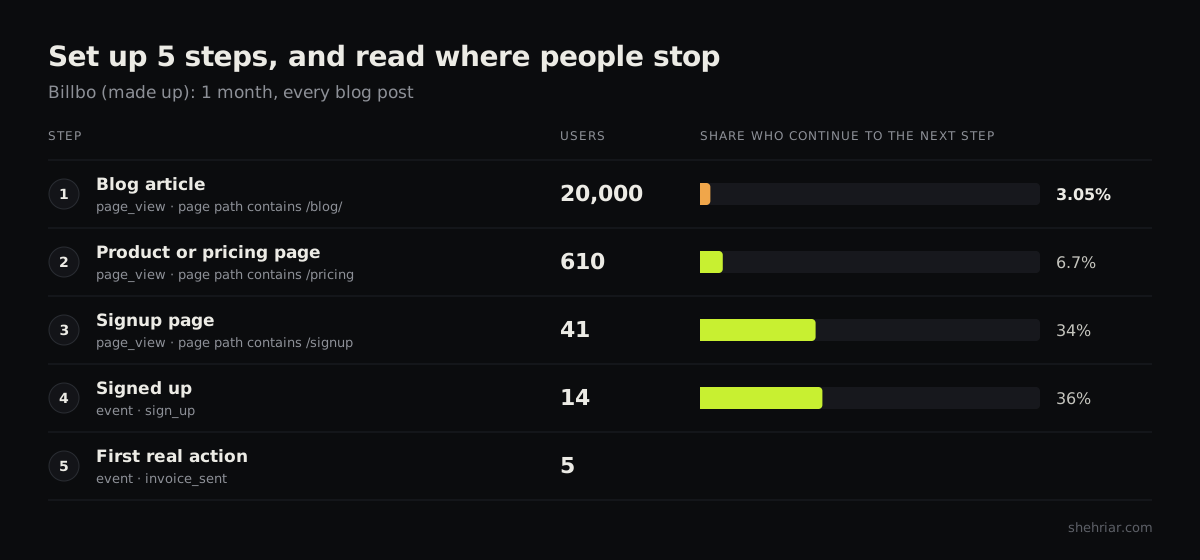
For a single post, use a Path exploration too. Set the post as the starting point and see where readers go.
Then read the funnel like this:
| What you see | Where the leak is |
|---|---|
| Month after month, almost nobody clicks onward | The article |
| They reach the product page, then leave | The product page |
| They start the signup and don't finish | The signup form |
| They sign up and never do the first real thing | The product |
Now ask 2 questions about the weakest step.
Is the next step specific to this article? Or is it a "start free trial" banner that fits any post?
Does the page they land on continue the same task? Or does it change the subject?
I can't give you a benchmark for clicks from article to product. I looked, and no credible one exists.
So record your own baseline per type of post. Then improve on it.
Billbo's result: the template post gets 4,000 readers a month, and 240 click through. Only 6 of them sign up.
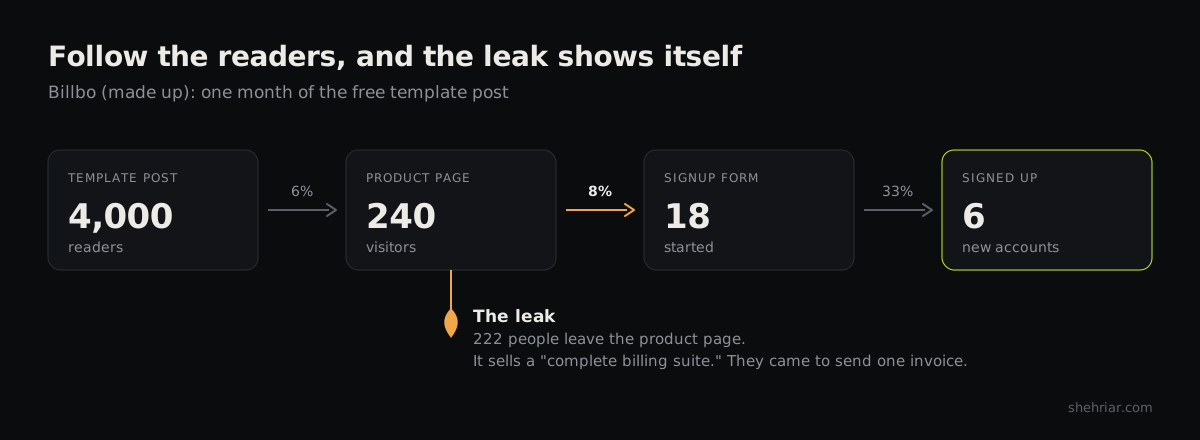
The product page sells "a complete billing suite". Those readers came to send 1 invoice today.
Check 5: Is the blog getting credit?#
This check takes the longest, so start it now.
- Add 1 field to your signup form: "How did you hear about us?"
- Make it free text, and make it required. Dropdowns only return your own guesses.
- In Search Console, add a Query filter and pick Branded queries. Compare 6 months with the 6 before.
- In GA4, open Traffic acquisition. Track direct sessions over the same period.
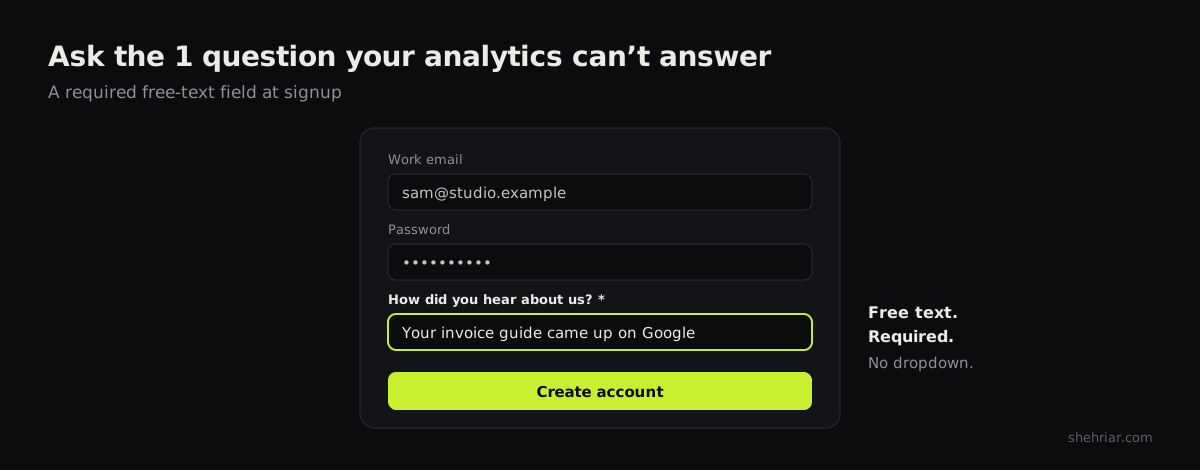
Read the answers every month. Count how many mention an article, a guide or "Google".
1 caution. People report what they remember, and memory isn't proof.
So use the answers next to your analytics, never in place of them.
You have this leak if branded searches and direct signups rise while blog-credited signups stay flat.
Billbo's result: 4 of last month's 14 signups mention "your invoice guide". The blog does more than the dashboard shows.
04 / 07How to fix each leak#
Now match the fix to the leak you found. Fix only what the checks pointed at.
Fix 1: Repair the count#
Fix the broken event or the cross-domain setup first. Then filter out your own team's visits.
After that, wait for clean data. Don't judge any post on numbers from before the repair.
Fix 2: Re-aim or deindex the parasite articles#
Ask 1 question about each one. Could the right buyer also be searching this topic?
If yes, re-aim the article. That's what I did with the page that got 70% of the traffic.
We sat down, found where the content let readers down, and improved it for the professional reader.
We also widened the page to cover the related terms real buyers use. That told Google which context the page belongs in.
Here's the same move as steps:
- Rewrite the title and intro for the buyer. Say who the page is for.
- Fix whatever disappoints the right reader. Check 2 showed you what they searched.
- Add sections on the related terms your buyers use.
- Link to the page from your other posts on those terms.
If no, deindex the article. That's what I did with the consumer how-to and the writing-tips article.
No rewrite would have turned those readers into buyers. So I took both out of search.
- Add a
noindexrobots tag to the page. - Don't block the page in robots.txt. Google must crawl it to see the tag.
- Remove it from your sitemap and your internal links.
- In a hurry? Use the Removals tool in Search Console. It hides the page while the tag takes effect.
Yes, your traffic chart will drop. That's the point, and it's fine.
Then stop writing more of them. 2 habits keep parasites out of my plan now.
I focus on the target market. The same topic can attract buyers in 1 market and bargain hunters in another.
So I check where a topic's readers are and who they are. Then I compare that with the customer list.
I also don't sell on "free". A pitch built on free stuff attracts people who never plan to pay.
Jason Lemkin of SaaStr makes the same trade. He'd take a few paying customers over a crowd of free ones.
So I lead with the job the product does. The free plan is a way in, not the headline.
Fix 3: Give the product a job#
For posts that scored 2 or 3, build the product into the steps:
- Find the step where the reader does the hard part by hand.
- Show your product doing that step. Add a screenshot of the result.
- Keep the manual way in the article. It must stay complete without you.
- Link that step to a page that continues the same task. Never the homepage.
- Remove the generic banner. The step is your call to action now.
For posts that scored 0 or 1, don't bolt on a signup button. A button on an unrelated topic is just an ad.
Offer something that fits instead:
- A free resource that finishes the reader's task.
- A link to a post where your product does fit.
- A small newsletter signup.
- Nothing at all. Some posts just earn trust.
For new posts, I flip the usual order. I start with what the product does, in customers' own words.
Then I find the searches that match. Fit comes first, and volume comes last.
Do you draft with AI? Give it material first: your product's real steps, your customers' words and your own results.
AI writes well from good material. It writes filler from none.
1 personal habit, since we're here. I hold an article back if the feature isn't ready, even for a small bug.
I want to serve you a ready-to-eat meal. That's my preference, not a law.
Fix 4: Repair the path#
Go to the step where Check 4 showed the drop.
The product page. Make its headline continue the article's task. Send readers to a page about that 1 job.
The signup form. Cut every field you don't need on day 1. Ask for the rest later.
The product. Get new users to a first result fast. That's product work, not content work.
Until it's done, more content only sends more people into the same hole.
Fix 5: Make the hidden work visible#
Tag each "How did you hear about us?" answer every month: blog, search, friend, social or other.
Then report 2 numbers side by side: signups GA4 credits to the blog, and signups that mention it.
And stop judging "learn" posts by signups. Judge them by the readers they pass to posts that sell.
05 / 07Sort your top 20 posts#
You've run the checks, and you know the fixes. Now sort your top 20 posts into 5 piles.
| What you found | What to do |
|---|---|
| Right reader, product has a job, no path to it | Build the product into the steps |
| Right reader, product has no job | Stop judging it by signups, or merge it |
| Wrong reader, but buyers search this too | Re-aim it |
| Wrong reader, and no buyer in sight | Deindex it, and stop writing more like it |
| Path is there, people drop after the click | Fix the page or the product, not the post |
Here's how Billbo's sorting went:
- The template post now builds the invoice in Billbo, step by step.
- The product page gets 1 promise: your first invoice in 2 minutes.
- The "what is an invoice" posts stay. Nobody judges them by signups anymore.
- The comparison post gets siblings, because it converts best.
Billbo didn't need new traffic. It stopped leaking the traffic it had.
I turned the 5 checks into a 1-page scoring sheet. Each post gets a pass or a fail per check.
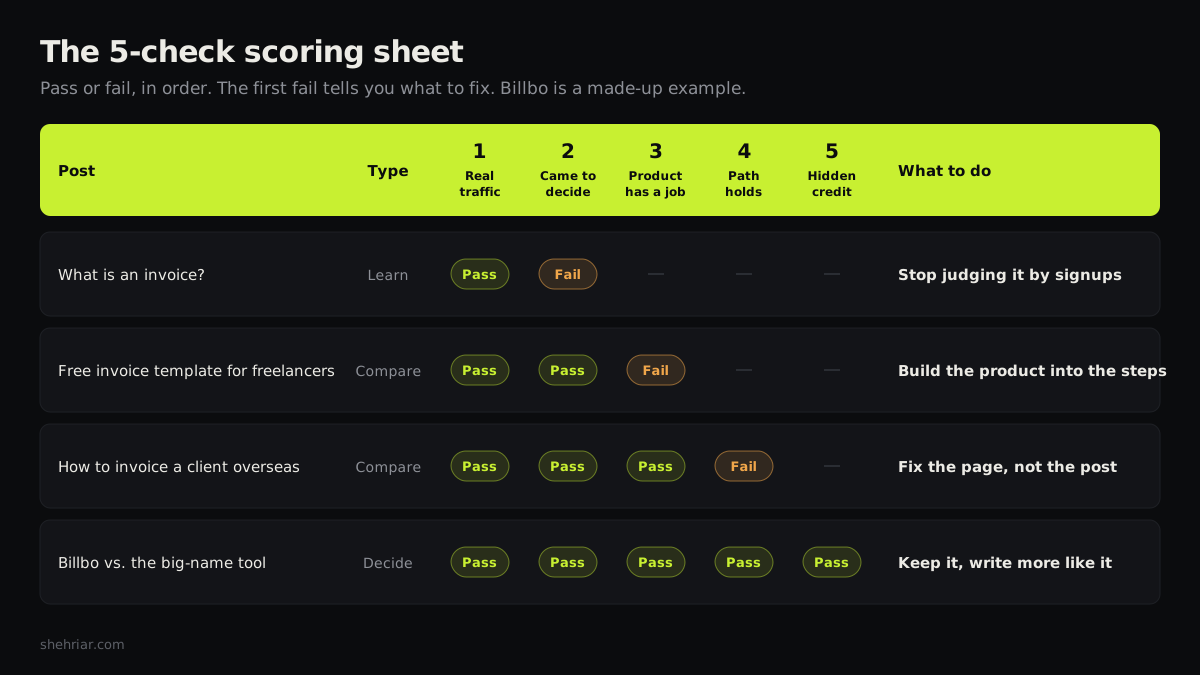
Copy the scoring sheet. It's free, and I won't ask for your email.
06 / 07Traffic was never the goal#
Customers are.
So find your leak before you write another post. Then fix that leak, and only that leak.
Want a second pair of eyes? I'll audit your content and build a plan for content-product fit.
07 / 07FAQ#
Why is my website getting traffic but no sales?
Usually because the visitors came to learn, not to buy. Check which searches bring them, then check whether your product has any part in the pages they land on. The same 5 checks work for sales and for signups.
Are blogs still worth it now that AI answers the question?
Yes, for posts that help someone choose a tool or finish a job. AI summaries take the clicks from "what is" posts first, and those readers rarely signed up anyway.
How many visits do I need before a conversion rate means anything?
Count signups, not visits. I wait for about 30 signups per type of post. With 3 signups from 300 visits, the true rate could be anywhere from 0.2% to 2.9%.
Should I delete blog posts that get traffic but no signups?
Not always. If the right buyer could also be searching that topic, rewrite the post for them. If not, deindex it with a noindex tag so it stops pulling the wrong crowd.
Is it the landing page, or was the traffic never going to buy?
Check the reader first. If the searches show buying intent and people still leave after clicking through, the page is the leak. If the searches are all "what is", the page was never the problem.